Tracking your expenses means writing down every dollar you spend, so you can see where your money actually goes instead of where you think it goes. It’s the step that turns a budget from a guess into a plan. The Consumer Financial Protection Bureau suggests tracking for a whole month rather than a week or two, and notes that many people who do it find small purchases that add up and don’t match their priorities.Source 1
This guide covers how to do it in six steps, compares four ways to keep track, shows a simple spreadsheet setup and works through one month of tracked spending.
How to track your expenses in 6 steps
1. Pick a start date and commit to a full month
A month captures the bills that arrive only once a month, such as rent, and gives you a total you can set against your income. If a whole month feels like too much, start with one or two weeks and build from there.Source 1
2. Write down your income and the bills you already know
Start with what you’re sure of: your take-home pay and the bills with set amounts and due dates. Go through your bank and card statements for anything paid automatically, since those are the easiest to leave out.Source 2
3. Record every purchase as it happens
The Federal Trade Commission’s advice is to write down what you spent each day.Source 3 The CFPB suggests keeping every receipt in an envelope, noting what you bought if the receipt doesn’t show it, and writing down the amount and the item when there’s no receipt at all.Source 1 Cash needs the most attention, because a statement shows the withdrawal but not what the money bought.
4. Sort each expense into a category
Pick categories that match how you spend, without so many that sorting becomes a chore. The CFPB’s spending tracker uses about a dozen, including housing and utilities, transport, groceries and other supplies, eating out, cell phone, debt payments, health expenses, entertainment and personal care, helping others and pets.Source 1 Our budget categories guide has a fuller list.
5. Total each category every week, then for the month
Once a week, add up what you spent in each category. At the end of the month, add the weekly figures for each category, then add the categories together for your total spending.Source 1 A weekly check-in also catches a category that’s running high while there’s still time to slow down.
6. Compare with your plan and decide what to change
At the end of the month, see whether you spent what you planned.Source 3 Mark the expenses that are the same every month, such as rent, a car payment or a phone bill, since those are usually needs and obligations. Then look for areas you could cut back or drop, which are usually wants.Source 1 Our budgeting guide shows how to turn those totals into next month’s plan.
Four ways to keep track
The method matters less than using it every day, and each one trades effort for detail in a different way.
Receipts and a notebook
The simplest setup is a small notebook, or a note on your phone, plus an envelope for receipts. It handles cash well and costs nothing. The catch is that it depends on your memory, and automatic payments won’t appear unless you add them yourself.
Bank and card statements
Statements list every card purchase, transfer and automatic payment, which makes them the surest way to catch charges you’d otherwise miss. They can’t show what cash was spent on, though, and you’ll still need to sort each transaction into a category. If your bank lets you download transactions as a spreadsheet file, that saves retyping them.
A spreadsheet
A spreadsheet lets you choose your own categories and does the adding for you. Expect a few minutes a day, or one weekly session copying transactions from your statements. The setup is described in the next section.
A budgeting app
Apps can pull in transactions on their own and sort them as you go, which saves the most time. Before you rely on one, find out whether it charges a fee, since some apps that appear to be free charge for certain uses. Some apps pull information from your financial accounts automatically, but only after you give permission.Source 4 If you connect your accounts, protect them: use a long, strong password you don’t use anywhere else, turn on two-factor authentication, don’t save financial passwords on your phone, and avoid financial transactions on public Wi-Fi.Source 4
How to set up an expense tracker in a spreadsheet
Excel and Google Sheets both work. Make four columns:
- Date
- What it was, such as the store or a short description
- Category, chosen from a fixed list so the names always match
- Amount
Next to that, make a short summary table with one row per category. With categories in column C, amounts in column D and a category name in cell F2, this formula adds up everything in that category: =SUMIF(C:C,F2,D:D). It checks each cell in the first range against the condition, here the category name, and totals the matching amounts from the last range.Source 5 The formula is written the same way in Google Sheets.Source 6 Copy the formula down the summary table, and every total updates as you add expenses. Start a new tab each month so the months stay separate.
Want a ready-made layout? Our free budget template includes a printable spending tracker page, and the Monthly Budget Calculator can export your plan as a CSV file to build on.
A month of tracking, worked through
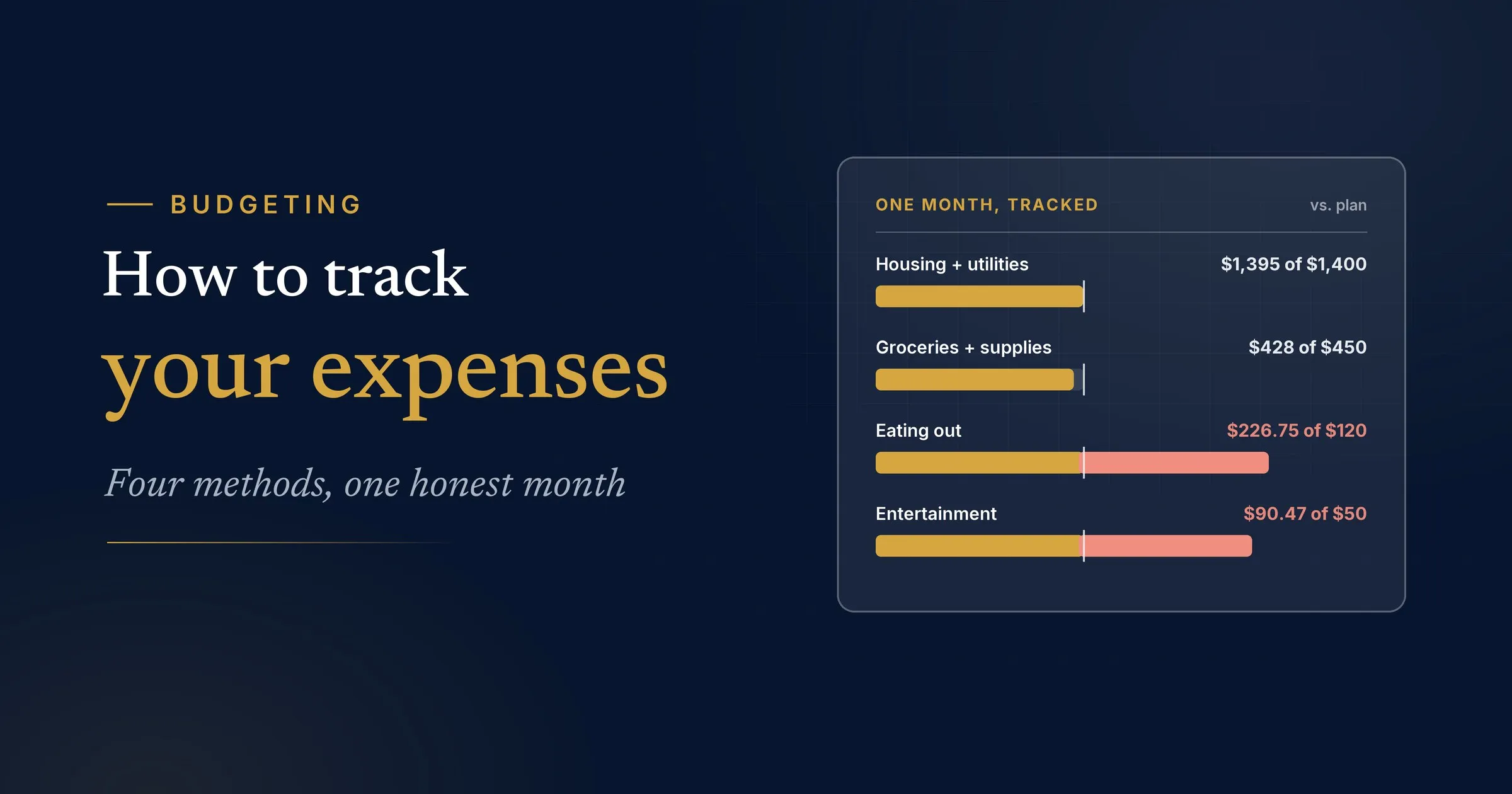
Here’s one month for someone who takes home $3,200 and planned to spend $2,615, leaving $585 to save. Every purchase was written down, sorted into the CFPB’s categories and totaled at the end of the month.
| Category | Planned | Tracked |
|---|---|---|
| Housing + utilities | $1,400 | $1,395 |
| Transport | $290 | $278 |
| Groceries + other supplies | $450 | $428 |
| Eating out | $120 | $226.75 |
| Entertainment + personal care | $50 | $90.47 |
| Cell phone | $55 | $55 |
| Debt payment | $150 | $150 |
| Health expenses | $40 | $22 |
| Helping others | $60 | $40 |
| Total | $2,615 | $2,685.22 |
Example figures. Categories follow the CFPB's spending tracker.
What the month showed
- Spending came to $2,685.22, which is $70.22 more than planned, so $514.78 was left to save instead of $585.
- Only two categories went over, by $147.22 combined. Everything else came in at or under the plan.
- Eating out was the biggest gap: 17 purchases added up to $226.75, against $120 planned, and nine coffees at $5.75 made up $51.75 of it.
- Entertainment and personal care ran $40.47 over, partly because of three streaming subscriptions costing $36.47 a month.
The fix is now specific: set an eating-out amount that matches real life or cut back on the coffees, and cancel a subscription that isn’t earning its place. A month of tracking turned a vague sense of overspending into two numbers you can act on.
Expenses that are easy to miss
- Automatic payments and subscriptions, which never pass through your hands,Source 2 including buy now, pay later installments.
- Cash, including small purchases and tips.
- Bills that come once or twice a year, such as car registration, insurance premiums or memberships. Divide each by 12 to see its monthly cost; our sinking funds guide shows how to save for them.
- Irregular spending, such as gifts, school costs and repairs.
- Fees, such as ATM, late and overdraft fees, which are easy to dismiss one at a time. Our guide to avoiding bank fees shows how to stop paying them.
If tracking shows your money runs out before payday even when the month adds up, our guide to stopping the paycheck-to-paycheck cycle shows how to line up your bills with your pay. To lower the costs you find, see fixed vs. variable expenses.
Tracking expenses for taxes if you’re self-employed
If you’re self-employed or have a side business, tracking also builds the records you’ll need at tax time. The IRS says you may choose any recordkeeping system suited to your business that clearly shows your income and expenses, and that except in a few cases the law doesn’t require any special kind of records. Good records help you keep track of deductible expenses and support the items you report on your tax return.Source 7
Keep the receipts and statements behind each item of income or deduction until the period of limitations for that return runs out. In the most common case that’s 3 years, and some situations call for longer.Source 8 Keeping business spending in its own category, or in a separate account, makes it far easier to pull together when you file.
Common questions
What is the best way to track expenses?
The one you’ll keep using. Statements are best for catching automatic payments, a notebook is best for cash, and a spreadsheet or an app saves time on the adding up. Many people combine two, such as statements for card spending and a quick daily note for cash.
How long should I track my spending?
At least a month, so you see the bills that come once a month as well as the weekly ones.Source 1 After that, keep tracking if it helps, or check in weekly as you follow your budget.
What are the three biggest expenses for most households?
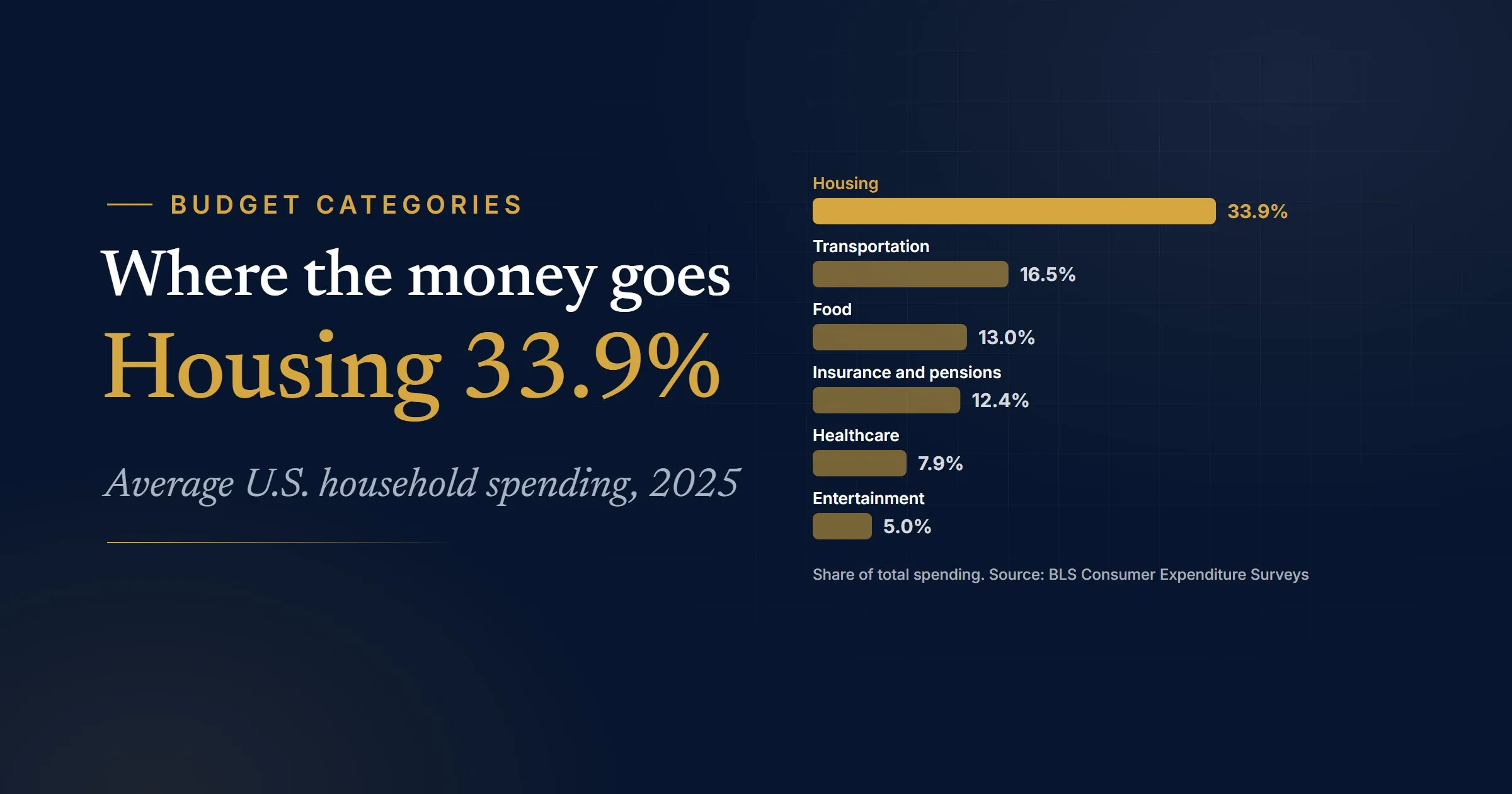
Housing, transportation and food. In 2025, the average household spent 33.9% of its budget on housing, 16.5% on transportation and 13.0% on food.Source 9
Is there a free way to track expenses?
Yes. You can download the CFPB’s spending tracker as a printable, fillable worksheet,Source 1 use a spreadsheet program you already have, or work from your bank and card statements. Many apps cost nothing to start, but check what they charge before you rely on one.Source 4
How do I track cash spending?
Ask for a receipt every time and keep them together, or write down the amount and what it was for as soon as you pay.Source 1
Should I track expenses daily or weekly?
Record purchases daily, while you still remember them,Source 3 and add up the category totals once a week.Source 1
Sources
Numbers in the text link to these sources. We check them whenever we update this page.
- 1
Spending tracker (Your Money, Your Goals toolkit)(external site)
Consumer Financial Protection Bureau · Accessed November 25, 2026 · Back to text for source 1
- 2
Bill calendar (Your Money, Your Goals toolkit)(external site)
Consumer Financial Protection Bureau · Accessed November 25, 2026 · Back to text for source 2
- 3
Making a Budget(external site)
Federal Trade Commission, consumer.gov · Accessed November 25, 2026 · Back to text for source 3
- 4
Your Money, Your Goals: A financial empowerment toolkit(external site)
Consumer Financial Protection Bureau · Accessed November 25, 2026 · Back to text for source 4
- 5
Microsoft Support · Accessed November 25, 2026 · Back to text for source 5
- 6
Google Docs Editors Help · Accessed November 25, 2026 · Back to text for source 6
- 7
Internal Revenue Service · Last reviewed November 19, 2026 · Accessed November 25, 2026 · Back to text for source 7
- 8
How long should I keep records?(external site)
Internal Revenue Service · Last reviewed June 30, 2026 · Accessed November 25, 2026 · Back to text for source 8
- 9
Consumer Expenditures--2025(external site)
U.S. Bureau of Labor Statistics · Published October 29, 2026 · Accessed November 25, 2026 · Back to text for source 9
About the author
Wealthistry Editorial Team
Research, writing and editing
The team that researches, writes, fact-checks and updates Wealthistry's guides and calculators, following our published editorial standards.
Author profileEditorial policyHow we researchReport an error